
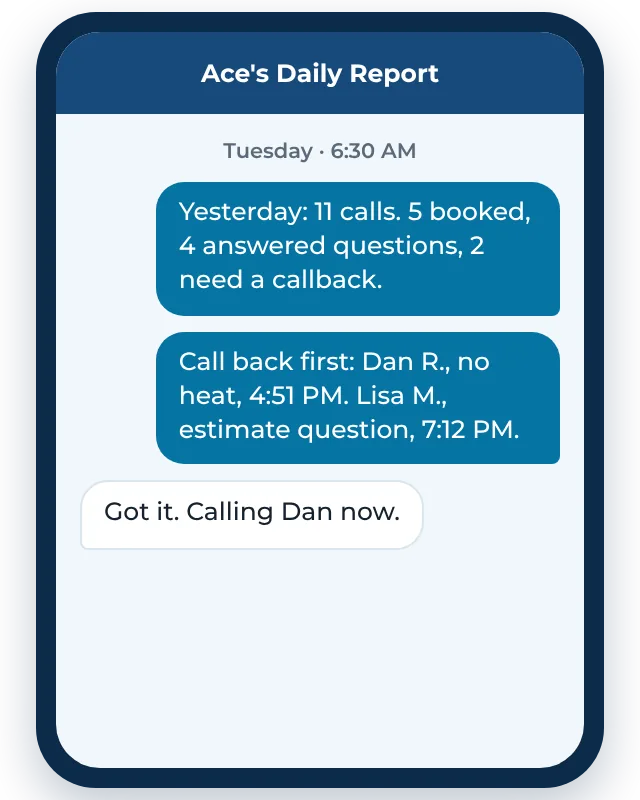
No spreadsheet, and nothing you have to log in to. You know where things stand before your first coffee. When you want the full picture, the mobile app shows every call, text, chat, and booking in one place.
What's in the report
- Every call from yesterday: answered by you, answered by Ace, or missed.
- What each caller needed, in a sentence or two.
- What got booked, and when.
- Who still needs a callback, at the top, so you can handle them first.
- New leads from your website, Google, and Facebook, and whether they replied to your follow-up.
Every conversation in one app
The report is the quick version. The dashboard is everything. On the mobile app (or a computer, if you prefer), you can see every call, text, website chat, and lead form in one list, with the full conversation, call summaries, and what got booked. You can reply to a customer right from the app, and so can anyone on your team you give access to.
We set up the app on your phone during onboarding. You never have to open it if the morning text is enough, but it's there when you need to look something up.
A missed call log you'll actually read
Your phone already keeps a call log, but it's a list of numbers. It doesn't tell you which ones were new customers, which were your supplier, and which were spam. The daily report does the sorting for you and puts the calls that matter on top.
Why it matters
You can't fix what you can't see. A week of reports shows you when calls come in, how many happen while you're on jobs, and how many jobs you were losing before. That makes the rest of the decisions easy: whether you need Ace covering after hours, whether your missed-call text back message is getting replies, and when to call people back.
How we set it up
There's nothing for you to install. During setup we connect your business line, Ace, your missed-call text back, and your lead sources, so every call and lead ends up in one place. Then we pick the time the report goes out and who gets it. You'll see a test report before anything goes live, and we'll change what's in it until it's useful to you.
If a caller on the report needs a callback, tap their number right from the text. No hunting through your call history or voicemail.
Call tracking for contractors, kept simple
Big call tracking tools are built for marketing departments. You run a crew. The daily report gives you the part that's useful to an owner (who called and what happened) without the charts and logins. If you want more detail on a call, just ask and we'll pull it.
Built for the trades
Here’s how daily call report works for the trades we work with most:
Works best with
Questions about daily call report
What time does the report come?
Early morning by default. We can change the time to fit when you start your day.
Can my office manager get it too?
Yes. We can send it to more than one person.
Do I need to install anything?
Not for the report. It's a text message to your phone. If you want the full dashboard, we help you set up the mobile app.